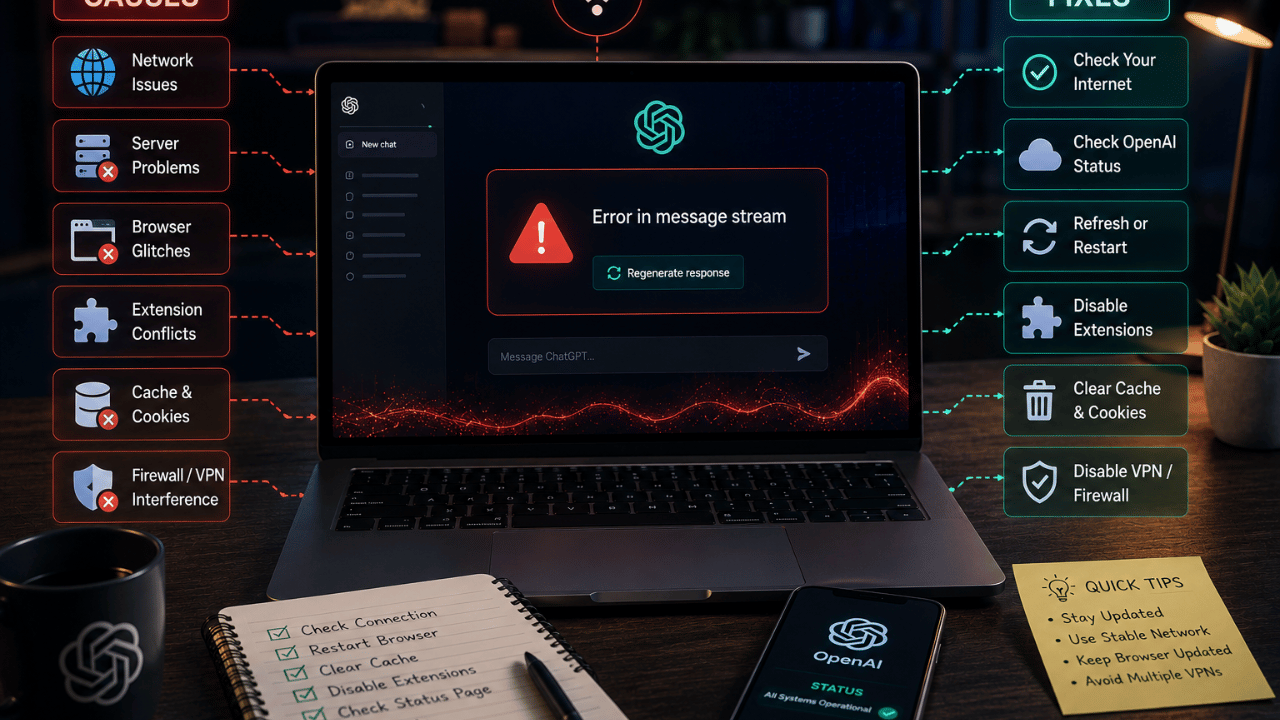
“Error in message stream” is one of the most common ChatGPT errors reported in 2026, and it almost always comes down to one of five things: an unstable connection, an overloaded server on OpenAI’s end, a browser extension conflict, a corrupted cache, or a temporary outage. This guide walks through what causes it and exactly how to fix it, in order of what actually works.
Key Takeaways
- “Error in message stream” means ChatGPT’s response was interrupted mid-generation — it’s a connection issue, not a bug in your account
- Refreshing the page and checking OpenAI’s status page solves it roughly 60% of the time
- Browser extensions (especially ad blockers and VPN extensions) are a leading cause on desktop
- Switching networks or disabling a VPN fixes it almost instantly if the issue is connection-related
- If the error persists across devices and networks, it’s usually a server-side outage — not something you can fix locally
What Is the “Error in Message Stream” in ChatGPT?
The “error in message stream” is a message that appears when ChatGPT’s server stops sending data mid-response, cutting off an answer before it finishes generating. It happens because ChatGPT streams responses token-by-token in real time, and anything that interrupts that live connection — a dropped Wi-Fi signal, a server timeout, or a browser blocking the data stream — triggers this error.
This is different from a “network error” (which usually means your device never connected at all) or a “something went wrong” message (which is a broader catch-all error). The message-stream error specifically means the connection was working, then broke partway through.
Why Does This Error Happen? (Main Causes)
1. Unstable or Slow Internet Connection
Because ChatGPT streams text live, even a brief drop in bandwidth — switching from Wi-Fi to mobile data, a router hiccup, or a public network with packet loss — can cut the stream mid-message. This is the single most common cause reported by users.
2. OpenAI Server Load or Outage
During peak usage hours (especially US morning hours when both US and international traffic overlap) or during a partial outage, OpenAI’s servers can drop streaming connections. You can confirm this in seconds by checking OpenAI’s status page directly rather than guessing.
3. Browser Extensions Blocking the Stream
Ad blockers, privacy extensions, and some VPN browser extensions inspect or filter network requests — and streaming (Server-Sent Events) connections are sometimes misidentified as ads or trackers and get cut off. This is especially common in Chrome and Brave.
4. Corrupted Browser Cache or Cookies
A stale cache can cause ChatGPT’s web app to hold onto a broken session token, which interrupts the stream even when your connection is fine.
5. VPN or Proxy Interference
VPNs that frequently rotate IP addresses mid-session can break a long-lived streaming connection, since the server sees the request “move” to a different IP partway through.
Step-by-Step Guide: How to Fix “Error in Message Stream”
Step 1: Refresh and Resend
Reload the page (or close and reopen the app) and resend your last message. This alone resolves the error in most cases because it re-establishes a fresh connection.
Step 2: Check OpenAI’s Status Page
Visit OpenAI’s official status page to see if there’s a known incident. If ChatGPT is degraded for everyone, no local fix will help — wait it out and check back in 15–30 minutes.
Step 3: Disable Browser Extensions Temporarily
Turn off ad blockers, VPN extensions, and privacy tools one at a time (or use an incognito/private window with extensions disabled) and try again. If it works in incognito mode, an extension is the culprit.
Step 4: Clear Cache and Cookies for chat.openai.com
Clear your browser’s cache and cookies specifically for the ChatGPT domain, then log back in. This resets any corrupted session data.
Step 5: Switch Networks
If you’re on Wi-Fi, try mobile data (or vice versa). If the error disappears, your original network connection was the cause.
Step 6: Turn Off VPN or Proxy
Disconnect any VPN and try again on your regular connection. If ChatGPT works without the VPN, use a VPN with a stable, non-rotating IP instead.
Step 7: Try the Mobile App or a Different Browser
If the web app keeps failing, the ChatGPT mobile app or a different browser (e.g., switching from Chrome to Firefox) can isolate whether the issue is browser-specific.
Frequently Asked Questions
Q: Does “error in message stream” mean I lost my ChatGPT conversation? No. Your conversation history is saved on OpenAI’s servers up to the last successful message. Only the interrupted response is lost — resend your prompt and it will regenerate.
Q: Is this error related to my ChatGPT Plus subscription or usage limits? Not directly. Hitting a usage cap produces a different message (usually about rate limits or model availability), not a message-stream error. This error is connection-related, not billing-related.
Q: Why does this happen more on mobile data than Wi-Fi? Mobile networks are more prone to brief signal drops and IP changes as you move between cell towers, both of which can interrupt a live streaming connection more easily than a stable Wi-Fi connection.
Q: Can a bad extension really break ChatGPT specifically? Yes. Extensions that filter network requests (ad blockers, privacy/tracking blockers, some VPNs) can misidentify ChatGPT’s streaming connection as third-party tracking traffic and block it, even though the rest of the page loads fine.
Q: What should I do if none of these fixes work? Report it through OpenAI’s official help center with your browser, device, and a timestamp — this is the fastest way to flag a server-side issue if it isn’t already on the status page.
Conclusion
The “error in message stream” in ChatGPT is almost always a connection-layer issue, not a problem with your account or your prompt. Start with the simplest fix — refresh and check the status page — before touching browser settings or your network. If you’re regularly running into interrupted responses, it’s worth comparing how other AI chatbots handle the same tasks: see our full ChatGPT vs Gemini vs Claude comparison to see which one fits your workflow best, or check out our guide on how to use Claude AI free in 2026 as a backup option during ChatGPT outages. If you write prompts regularly, our prompt engineering guide can also help you get more reliable results once the connection issue is fixed. For a broader look at AI writing tools beyond ChatGPT, see our best AI writing tools of 2026 roundup. And if you’re generally troubleshooting app/API errors, our guide on the “server invite API down” error covers a similar connection-level issue.
Written by the Tech Solution Editorial Team — covering AI tools, chatbots, and emerging tech since 2024. Have a tool you’d like us to review or troubleshoot? Contact us.