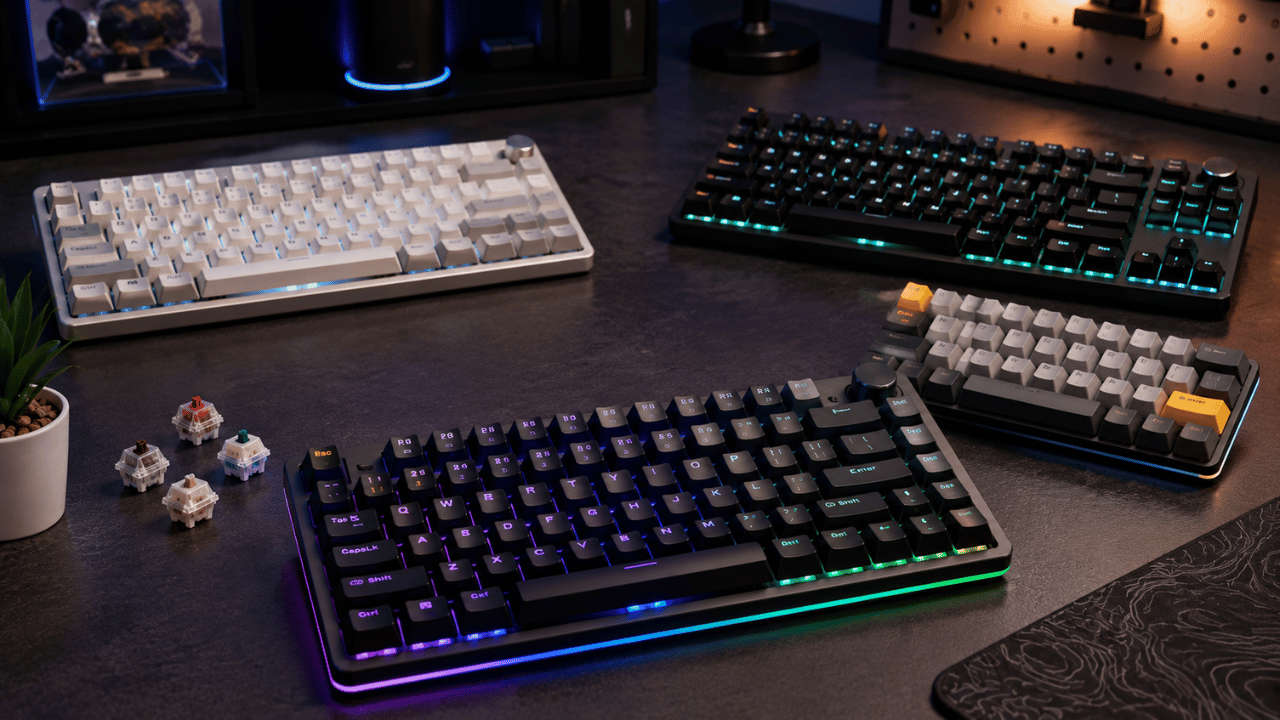
The best mechanical keyboard under $100 in 2026 is the Keychron V3 Max for most people — wireless, hot-swappable, gasket mounted, and fully programmable via QMK/VIA at approximately $90. For competitive gamers who need rapid trigger, the Epomaker TH80 Pro at $75 is the strongest pick. For pure budget value under $60, the Keychron C2 Pro and Ajazz AK820 Pro stand out as the most well-rounded options tested by independent reviewers.
Finding a genuinely good mechanical keyboard under $100 used to mean accepting real compromises — cheap ABS keycaps that wore shiny within months, soldered switches you could never replace, rattly stabilizers, and hollow plastic cases that felt nothing like the premium builds you saw online.
That reality no longer exists in 2026. As MKB Guide’s June 2026 analysis put it directly: “In 2026, $100 buys you a gaming keyboard that would have cost $200 five years ago. The budget gaming keyboard market has exploded in quality.”
We reviewed independent testing data from Tom’s Hardware, PicksLab, MKB Guide, KeebFinder, and LexAveBrew — all publishing 2026 updates — to identify which specific keyboards consistently earn their purchase price, and which ones look impressive on spec sheets but disappoint in real-world use.
What Should You Actually Look for in a Mechanical Keyboard Under $100?
The most important features to prioritize in a mechanical keyboard under $100 in 2026 are hot-swap switch sockets, gasket mounting, PBT keycaps, and the right switch type for your primary use case — not brand recognition or RGB lighting quantity.
Hot-Swap Sockets — Non-Negotiable in 2026
Hot-swap allows you to pull out and replace switches without soldering — changing your typing feel entirely without buying a new keyboard. As MKB Guide’s 2026 guide stated plainly: “Hot-swap is non-negotiable. It’s now standard, and any keyboard under $100 without it should be skipped. There are too many good hot-swap options to compromise.”
Gasket Mount — The Biggest Feel Upgrade
A gasket mount suspends the PCB between layers of soft material rather than screwing it directly to the case — the result is a softer, bouncier typing feel that significantly reduces noise and fatigue. Until 2023, this was exclusive to $150+ keyboards. In 2026, it appears at the $60 price point. Prioritize it when your budget allows.
PBT Keycaps — Durability Over Shine
PBT (polybutylene terephthalate) keycaps resist shine, warping, and wear far better than cheaper ABS plastic. According to LexAveBrew’s May 2026 review: “Most budget keyboards use cheaper ABS plastic that gets shiny and worn within months. PBT caps will look fresh for years.”
Switch Type — Linear, Tactile, or Clicky
- Linear (Red, Yellow): Smooth keystroke with no bump — preferred for gaming and fast typing
- Tactile (Brown, Clear): Noticeable bump at actuation point — good balance for typing and gaming
- Clicky (Blue, Green): Audible click with tactile bump — satisfying for typing, loud for offices
Layout — Size Matters for Your Desk
- Full-size (100%): Includes numpad — best for productivity and data entry
- TKL (80%): No numpad — popular gaming and general use balance
- 75%: Compact with function row and arrow keys — best desk space efficiency
- 65% / 60%: Very compact — preferred by minimalists and FPS gamers
1. Keychron V3 Max — Best Overall Under $100
Price: ~$90–$100
Layout: TKL (80%)
Best for: Most people — the safest all-around pick for typing and gaming
The Keychron V3 Max is the keyboard that multiple independent 2026 reviews converge on as the best overall mechanical keyboard under $100. PicksLab’s April 2026 analysis described it as the answer for most buyers: “wireless, hot-swappable, gasket mounted, QMK-programmable, and solidly built” — a combination of features that was previously only available at significantly higher price points.
The tri-mode connectivity (Bluetooth 5.1, 2.4GHz wireless dongle, USB-C wired) is particularly noteworthy. The 2.4GHz wireless mode provides input latency comparable to wired connections — making it genuinely viable for gaming, not just typing. A 4,000mAh battery delivers approximately 300 hours without backlighting, with around 200 hours with RGB enabled.
Key Specs:
- Layout: TKL 80%
- Mount: Gasket mount
- Connectivity: Tri-mode — Bluetooth 5.1, 2.4GHz, USB-C
- Hot-swap: Yes — 5-pin compatible
- Keycaps: Double-shot PBT
- Programmability: QMK / VIA full support
- Battery: 4,000mAh — ~300h without RGB
Pros:
- ✅ Gasket mount at this price is exceptional value
- ✅ Tri-mode wireless including 2.4GHz for gaming-grade latency
- ✅ Full QMK/VIA support — remap every key without coding
- ✅ Hot-swap — change switches anytime
- ✅ Double-shot PBT keycaps — durable and shine-resistant
Cons:
- ❌ Software can be unintuitive for first-time QMK users
- ❌ Occasional stock availability issues
- ❌ Stock switches are decent but not exceptional — you may want to swap
Verdict: The Keychron V3 Max is the mechanical keyboard we would recommend to most people asking “which one should I buy under $100?” in 2026. It has no meaningful weaknesses for its price.
2. Epomaker TH80 Pro — Best for Competitive Gaming
Price: ~$75
Layout: 75%
Best for: FPS gamers who want rapid trigger and Hall effect switches
The Epomaker TH80 Pro is the most accessible Hall effect keyboard with rapid trigger support in 2026 — and it sits at $75, a price point where this technology was simply unavailable two years ago. PicksLab’s April 2026 analysis was direct: “The TH80 Pro is the most accessible Hall effect keyboard with rapid trigger support. At $75, it brings magnetic switch technology — adjustable actuation, rapid trigger — to a price point that was $200+ territory two years ago.”
Hall effect switches use magnets instead of physical contact points — they never wear out and support adjustable actuation depth from 0.2mm. Rapid trigger means the key re-activates the instant it begins moving upward rather than waiting to fully reset — in FPS games like CS2 and Valorant, this translates to measurably faster counter-strafing and more responsive movement inputs.
Key Specs:
- Layout: 75% with function row and arrow keys
- Switches: Hall effect magnetic — adjustable actuation 0.2mm to 4.0mm
- Rapid Trigger: Yes — re-activates on upstroke immediately
- Connectivity: 2.4GHz wireless + Bluetooth + USB-C
- Mount: South-facing RGB gasket mount
- Hot-swap: Yes
Pros:
- ✅ Hall effect switches — never wear out, fully adjustable actuation
- ✅ Rapid trigger at $75 — unprecedented value in 2026
- ✅ 2.4GHz wireless for gaming-grade latency
- ✅ Gasket mount for better typing feel
- ✅ 75% layout — compact with function row and arrows retained
Cons:
- ❌ Hall effect tactile feel is different from traditional switches — not everyone prefers it
- ❌ Rapid trigger software requires initial setup time
- ❌ Not the best choice for pure typing — Hall effect optimized for gaming
Verdict: If you play competitive FPS games seriously, the TH80 Pro is a genuinely significant upgrade over traditional mechanical switches at a price that no longer requires justification. For everyone else, the V3 Max remains the better all-rounder.
3. Keychron C2 Pro — Best Full-Size Under $60
Price: ~$55
Layout: Full-size (100%)
Best for: Productivity users, data entry, office workers who want a numpad
Tom’s Hardware’s June 2026 update named the Keychron C2 Pro their top productivity pick, describing it as “nicely priced for a full-sized keyboard with business-friendly looks” and noting it features double-shot PBT keycaps and a removable braided USB cable — premium touches rarely found at this price. It is available in white or black backlit versions starting below $55.
The C2 Pro is wired-only — no wireless — which is the main tradeoff versus higher-priced Keychron models. For desk-bound office use where a cable is not a concern, this is a non-issue and the savings are significant.
Key Specs:
- Layout: Full-size 100% with numpad
- Mount: Tray mount (not gasket)
- Connectivity: Wired USB-C only
- Hot-swap: Yes
- Keycaps: Double-shot PBT
- Cable: Removable braided USB-C — 6 feet
- Switch options: Gateron Red (linear) or Brown (tactile)
Pros:
- ✅ Numpad included — essential for data entry and productivity
- ✅ Double-shot PBT keycaps at $55 — outstanding value
- ✅ Removable braided cable — easy to replace or travel with
- ✅ Hot-swap — future-proof switch flexibility
- ✅ Clean, professional appearance — suitable for office environments
Cons:
- ❌ Wired only — no wireless option
- ❌ Tray mount — less premium typing feel than gasket alternatives
- ❌ Basic software compared to QMK-compatible boards
Verdict: The C2 Pro is the best full-size mechanical keyboard under $60 in 2026. If you need a numpad and do not care about wireless, it is the obvious choice.
4. Ajazz AK820 Pro — Best Budget 75% With Premium Feel
Price: ~$60
Layout: 75%
Best for: Users who want a gasket mount, wireless, and a metal volume knob under $60
Tom’s Hardware’s June 2026 review named the Ajazz AK820 Pro their best budget 75% pick, highlighting that for just under $60 it delivers: wireless connectivity, a gasket mount design that “actually feels like a gasket mount”, a metal volume knob, hot-swap switches, and double-shot PBT keycaps — and even praised the software as “powerful and intuitive.”
The metal volume knob alone is a detail that typically appears on $100+ keyboards. Combined with the gasket mount feel and wireless capability, the AK820 Pro punches significantly above its price class.
Key Specs:
- Layout: 75% compact with function row and arrows
- Mount: Gasket — genuine gasket feel confirmed by Tom’s Hardware
- Connectivity: Wireless Bluetooth + USB-C wired
- Hot-swap: Yes
- Keycaps: Double-shot PBT
- Extra: Metal volume knob — press to mute, rotate to adjust
- Display: Small color display showing settings status
Pros:
- ✅ Genuine gasket mount at $60 — exceptional for the price
- ✅ Metal volume knob — premium quality-of-life feature
- ✅ Wireless + hot-swap at this price point
- ✅ Colour display for settings visibility
- ✅ Intuitive software — rare for budget keyboards
Cons:
- ❌ No 2.4GHz wireless — Bluetooth only (adds slight latency for gaming)
- ❌ Finding the correct software download from Ajazz’s website is confusing
- ❌ Stock switches are average — improvement comes from swapping
Verdict: The AK820 Pro is the best value 75% keyboard under $60 in 2026. If budget is tight but you still want gasket mount and wireless, this is where to start.
5. Akko 3087 — Best for Silent Office Use
Price: ~$55
Layout: TKL (87-key)
Best for: Shared office environments, libraries, anyone who needs a quiet keyboard
PicksLab’s April 2026 analysis specifically recommended the Akko 3087 with silent switches as the best pick for shared office environments: “The RK61 Plus with silent linear or silent tactile switches hits the open-office sweet spot: barely audible keypresses, wireless, compact layout.” The Akko 3087 occupies a similar position at TKL size — significantly quieter than standard mechanical switches while retaining mechanical feel.
Pros:
- ✅ Silent switches — significantly quieter than standard mechanical
- ✅ TKL layout — compact but retains function row and arrows
- ✅ PBT keycaps with Akko’s distinctive colorway options
- ✅ Affordable starting price
Cons:
- ❌ No hot-swap on base model — check specific variant before buying
- ❌ Wired only on most configurations
Verdict: If office noise is your primary concern, the Akko 3087 with silent switches solves it cleanly at a price that is easy to justify.
Quick Comparison Table
| Keyboard | Price | Layout | Wireless | Gasket | Hot-Swap | Best For |
|---|---|---|---|---|---|---|
| Keychron V3 Max | ~$90 | TKL 80% | ✅ Tri-mode | ✅ Yes | ✅ Yes | Best overall |
| Epomaker TH80 Pro | ~$75 | 75% | ✅ 2.4GHz+BT | ✅ Yes | ✅ Yes | Best for gaming |
| Keychron C2 Pro | ~$55 | Full 100% | ❌ Wired only | ❌ No | ✅ Yes | Best full-size |
| Ajazz AK820 Pro | ~$60 | 75% | ✅ Bluetooth | ✅ Yes | ✅ Yes | Best value 75% |
| Akko 3087 | ~$55 | TKL 87% | ❌ Wired only | ❌ No | Varies | Best silent |
Which Mechanical Keyboard Should YOU Buy?
- 🏆 Best all-around pick: Keychron V3 Max — wireless, gasket, hot-swap, QMK
- 🎮 Best for competitive FPS gaming: Epomaker TH80 Pro — Hall effect + rapid trigger
- 💼 Best for productivity with numpad: Keychron C2 Pro — full-size, PBT, hot-swap
- 💰 Best value under $60 with wireless: Ajazz AK820 Pro — gasket + volume knob
- 🔇 Best for quiet shared offices: Akko 3087 with silent switches
Final Thoughts
The mechanical keyboard market under $100 in 2026 is genuinely exceptional value. Features that required $150 to $200 just two years ago — gasket mounts, hot-swap sockets, tri-mode wireless, Hall effect switches — are now available for $60 to $90. The competition between Keychron, Epomaker, Ajazz, and RK has driven quality up dramatically while keeping prices flat.
If you are buying your first mechanical keyboard and do not want to overthink it: get the Keychron V3 Max. If you play competitive FPS games seriously: get the Epomaker TH80 Pro. Both will feel noticeably better than any membrane keyboard you have used, and the hot-swap capability means you can experiment with different switches later without replacing the board.
Pairing a new keyboard with the right setup? Read our guide on the Best Laptop Under $500 for Programming and our tips on How to Speed Up Your Windows 11 PC for a complete productivity upgrade.
Frequently Asked Questions
What is the best mechanical keyboard under $100 in 2026?
The Keychron V3 Max at approximately $90 is the best mechanical keyboard under $100 for most people in 2026. It combines tri-mode wireless connectivity including 2.4GHz, a gasket mount for improved typing feel, hot-swappable switches, double-shot PBT keycaps, and full QMK/VIA programmability — a combination of features that was previously only available at $150 or higher. For competitive FPS gamers specifically, the Epomaker TH80 Pro at $75 is the stronger pick due to its Hall effect switches and rapid trigger support.
What is a gasket mount and why does it matter?
A gasket mount suspends the keyboard’s PCB between layers of soft silicone or foam material rather than screwing it directly to the case. This creates a softer, bouncier typing feel that significantly reduces noise, absorbs typing fatigue, and gives the keyboard a more premium sound profile — often described as “thocky” by enthusiasts. Until 2023, gasket mounts were exclusive to keyboards priced $150 or higher. In 2026, they appear at the $55 to $60 price point, making them one of the most significant value improvements in the budget keyboard market.
What are Hall effect keyboard switches and are they worth it?
Hall effect switches use magnets instead of physical contact points to register keystrokes, meaning they never wear out through mechanical degradation. More importantly for gamers, they support adjustable actuation depth — you can set how far you need to press the key to register — and rapid trigger, which re-activates the key the instant it begins moving upward rather than waiting for full reset. For competitive FPS games like CS2 and Valorant, rapid trigger provides measurably faster response. For everyday typing, traditional mechanical switches provide better tactile and clicky options. The Epomaker TH80 Pro at $75 is the most accessible Hall effect keyboard in 2026.
Is hot-swap important in a mechanical keyboard?
Yes — hot-swap is one of the most important features to look for in any mechanical keyboard under $100 in 2026. Hot-swap sockets let you pull out and replace switches without soldering, allowing you to change the entire feel and sound of your keyboard by swapping to different switches — without buying a new board. In 2026, hot-swap has become standard at this price tier, and any keyboard without it should generally be skipped given how many hot-swap alternatives exist at the same price.
What switch type should a beginner choose?
For most beginners, a tactile switch like Gateron Brown or Akko Cream Yellow provides a good introduction to mechanical keyboards — the tactile bump at the actuation point gives physical feedback without the loud click of blue switches, making it suitable for both typing and gaming. If you primarily game (especially FPS), a linear switch like Gateron Red offers smoother, faster actuation without the tactile bump. If you mostly type and enjoy audible feedback, clicky switches like Gateron Blue are satisfying but too loud for shared office environments.
Does keyboard size matter for gaming?
Yes — keyboard size directly affects how much desk space you have for mouse movement. A full-size keyboard with numpad pushes your mouse further right, reducing the space available for wide arm swings in FPS games. Most competitive gamers prefer TKL (80%), 75%, or 65% layouts that remove the numpad and give more consistent mouse positioning. The 75% layout — used by keyboards like the V3 Max and TH80 Pro — is widely considered the best balance, retaining function keys and arrow keys while significantly reducing footprint.